The Challenge
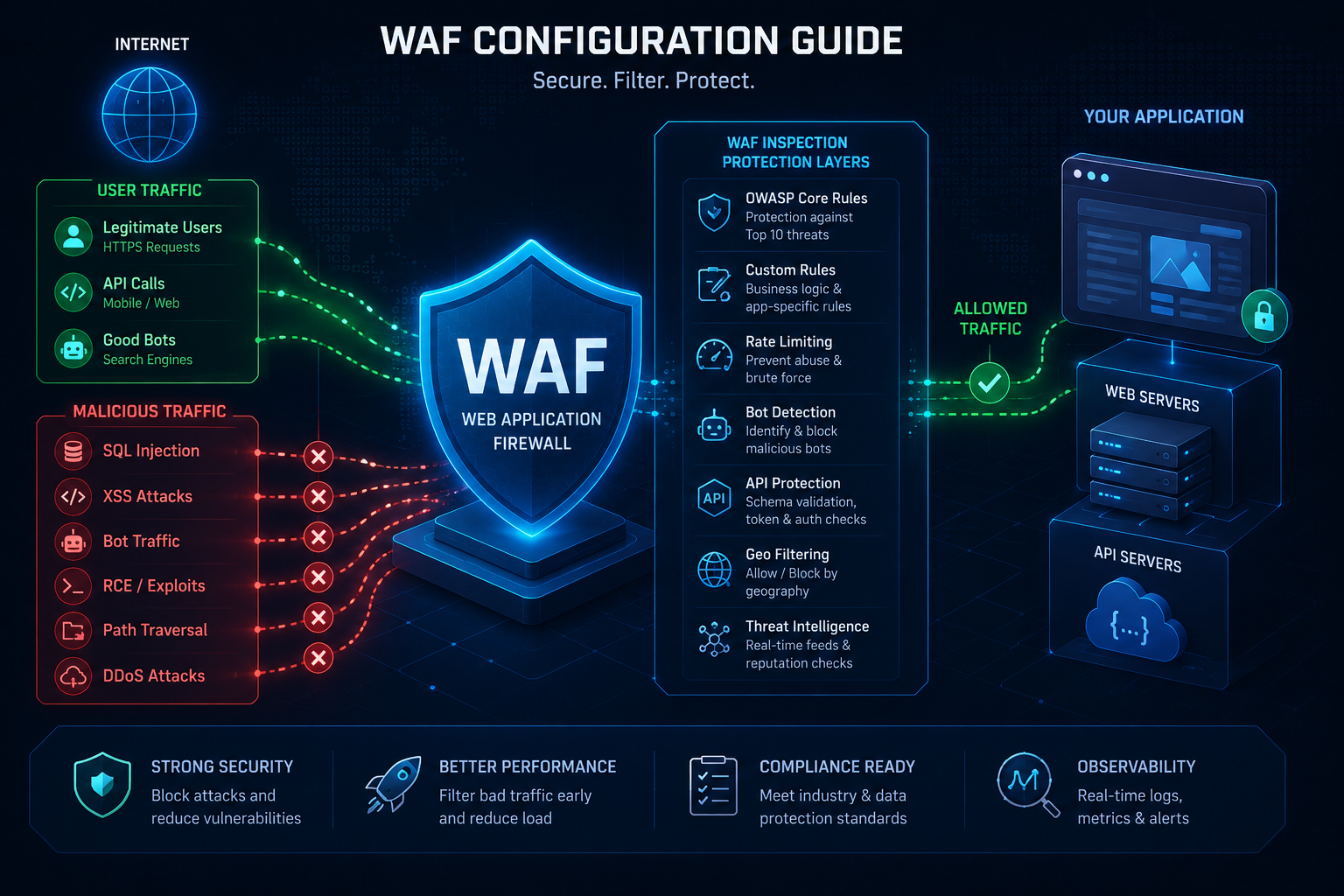
Web Application Firewalls (WAFs) are critical for protecting against OWASP Top 10 vulnerabilities—SQL injection, cross-site scripting (XSS), DDoS, and bot attacks. Yet most organizations deploy WAFs with default rules, leaving them vulnerable to sophisticated attacks while generating excessive false positives.
In this guide, we’ll walk through best practices for configuring WAF rules across major CDN platforms.
1. Understand Your WAF Rule Categories
Most modern WAFs (Akamai, Cloudflare, Fastly) use similar rule structures:
- Managed Rule Sets: Pre-built rules maintained by the WAF vendor (e.g., OWASP CRS)
- Custom Rules: Your own detection logic based on traffic patterns
- Rate Limiting: Threshold-based blocking (requests/second)
- Bot Management: Detecting and blocking malicious bots
- IP Reputation: Blocking known malicious IPs
Best Practice
Enable managed rules as your baseline, then layer custom rules for your specific application patterns.
2. Platform-Specific Configuration
Akamai
Akamai’s KRS (Kona Rule Set) is highly tunable:
- Start with “Strict” mode, then gradually move to “Balanced”
- Use “Alerts” mode first to identify legitimate traffic being blocked
- Whitelist critical API endpoints to reduce false positives
Recommended Rule Settings:
- Paranoia Level: 2-3 (balanced)
- False Positive Sensitivity: Low
- Attack Group Priority: SQL Injection > XSS > RFI > LFI
Cloudflare
Cloudflare’s OWASP rule set is beginner-friendly:
- Enable “Sensitivity Level: High” for e-commerce sites
- Use “Challenge” mode for first-time offenders
- Monitor false positives via Analytics for 1-2 weeks
Recommended Rule Settings:
- OWASP ModSecurity Core Rule Set: Enabled
- Sensitivity: Medium (start here)
- Action: Challenge (not Block) for first 2 weeks
Fastly
Fastly’s VCL-based rules offer maximum flexibility:
- Use Fastly’s pre-built modules (ModSecurity integration)
- Build custom VCL rules for app-specific threats
- Test in “Log” mode before enforcement
3. Tuning for Your Application
Step 1: Establish Baseline
Monitor your WAF for 2 weeks in “Alert” or “Log” mode. Capture:
- Attack types being blocked
- False positive rate
- Legitimate vs. malicious traffic patterns
Step 2: Create Whitelist Rules
Common false positives to whitelist:
- Admin API endpoints (reduce sensitivity)
- File upload endpoints (disable file type checks if handling custom files)
- Search functionality (disable SQL injection checks if needed)
Step 3: Tune Rule Sensitivity
Adjust individual rule thresholds:
- SQL Injection: High sensitivity (rarely false positives)
- XSS: Medium sensitivity (more false positives with rich content)
- Rate Limiting: Start at 1000 req/min, adjust down if needed
4. Monitoring & Response
Key Metrics to Track
1. Block Rate: % of traffic blocked (target: 0.5-2%)
2. False Positive Ratio: Blocks on legitimate traffic (target: <5%)
3. Attack Detection Latency: Time to identify new attack patterns
4. SLA Impact: Ensure WAF doesn't degrade response times
Setting Up Alerts
- Alert on sudden spike in blocks (10x normal rate)
- Alert on specific attack types (SQL injection, RFI)
- Daily summary reports of top blocked requests
Response Actions
If false positive rate > 5%:
- Review blocked requests (most WAFs provide logging)
- Create exception rules for legitimate patterns
- Lower rule sensitivity for affected attack types
5. Common Mistakes to Avoid
❌ Deploying in “Block” mode immediately — Always start with “Alert” or “Challenge”
❌ Using default rules without tuning — Default settings cause excessive false positives
❌ Not monitoring legitimate traffic impact — WAF blocks can hurt performance
❌ Forgetting to whitelist internal tools — Admin dashboards, APIs often get blocked
❌ Ignoring WAF logs — Logs are your best source of truth for tuning
6. Next Steps
- Review your current WAF configuration — Is it in “Block” or “Alert” mode?
- Check false positive rates — Are legitimate requests being blocked?
- Layer additional protections — WAF + rate limiting + bot management = defense in depth
Need help tuning your WAF? Astrav Consulting offers CDN security assessments and managed WAF optimization services. Get started →
This post is part of our CDN Security series. Next: API Rate Limiting Best Practices